
ALiGN Tools
  • Home
  • Table of Contents
  • Career Counsellor
    • The Spark Portrait
    • The Splash App
    • Presentation (1 of 2)
    • Presentation (2 of 2)
    • Lumina Splash App
    • Facilitator Guide
    • Job Seeker Dashboard
    • Job Aid for Employers
  • Job Seekers
    • Spark Portrait - Video
    • Spark Portrait - Workbook
    • Notes for Career Counsellors
    • Strategies for Working Together
    • Job Seeker Questionnaire
    • Completing the Assessment
    • My Personal ALiGN Guide
    • Job Fit Guide
    • Job Ad Activity - Examples
    • ALiGN Career Workbook
    • Lumina Splash App Instructions
  • Home
  • Table of Contents
  • Career Counsellor
    • The Spark Portrait
    • The Splash App
    • Presentation (1 of 2)
    • Presentation (2 of 2)
    • Lumina Splash App
    • Facilitator Guide
    • Job Seeker Dashboard
    • Job Aid for Employers
  • Job Seekers
    • Spark Portrait - Video
    • Spark Portrait - Workbook
    • Notes for Career Counsellors
    • Strategies for Working Together
    • Job Seeker Questionnaire
    • Completing the Assessment
    • My Personal ALiGN Guide
    • Job Fit Guide
    • Job Ad Activity - Examples
    • ALiGN Career Workbook
    • Lumina Splash App Instructions
Picture
Module 1 - Spark Portrait

Strategies for Working Together

Lumina for ALiGN Associates

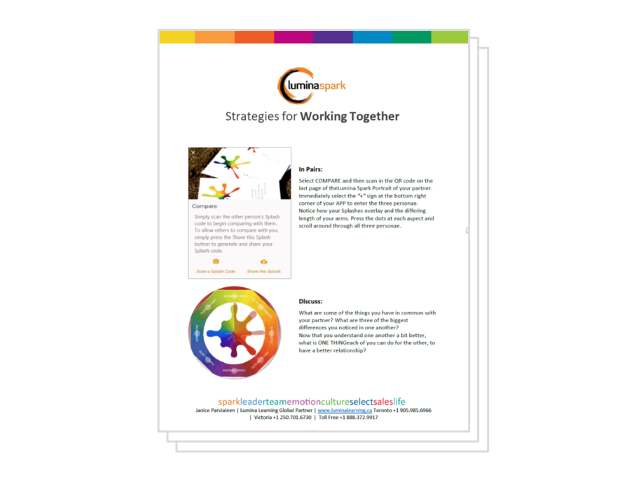
Spark Portrait - Strategies for Working Together


Help job seekers compare their Lumina Spark Portrait with others. Job Seekers complete an activity in which they scan another individual’s portrait and discuss the similarities and differences and how to interact with each other better based on that understanding. 

Picture
Audience: Job Seeker
Format:  PDF
Program: Lumina for ALiGN Associates
Course: Splash App

Picture
  • Strategies for Working Together

Picture
  • The Splash App
  • Lumina Splash App Instructions

Picture
  • Complete Module Two - Splash App from the Lumina for ALiGN Associates eLearning program to experience the Splash App and gain tips for facilitating the lesson.
  • Download the handouts upon successfully completing the course quiz.
  • Create lesson plan and notes based on the training option being used.

Picture
  • Ask job seekers to complete the activity with a member of their family or friend.
  • Facilitate a training session, in a classroom setting, in which you review the same information and activities shown in the video and eLearning.
← Notes for Career Counsellors
Job Seeker Questionnaire →
Picture
Picture
Picture

Copyright © 2024 OTEC
  • Home
  • Table of Contents
  • Career Counsellor
    • The Spark Portrait
    • The Splash App
    • Presentation (1 of 2)
    • Presentation (2 of 2)
    • Lumina Splash App
    • Facilitator Guide
    • Job Seeker Dashboard
    • Job Aid for Employers
  • Job Seekers
    • Spark Portrait - Video
    • Spark Portrait - Workbook
    • Notes for Career Counsellors
    • Strategies for Working Together
    • Job Seeker Questionnaire
    • Completing the Assessment
    • My Personal ALiGN Guide
    • Job Fit Guide
    • Job Ad Activity - Examples
    • ALiGN Career Workbook
    • Lumina Splash App Instructions