
ALiGN Tools
  • Home
  • Table of Contents
  • Career Counsellor
    • The Spark Portrait
    • The Splash App
    • Presentation (1 of 2)
    • Presentation (2 of 2)
    • Lumina Splash App
    • Facilitator Guide
    • Job Seeker Dashboard
    • Job Aid for Employers
  • Job Seekers
    • Spark Portrait - Video
    • Spark Portrait - Workbook
    • Notes for Career Counsellors
    • Strategies for Working Together
    • Job Seeker Questionnaire
    • Completing the Assessment
    • My Personal ALiGN Guide
    • Job Fit Guide
    • Job Ad Activity - Examples
    • ALiGN Career Workbook
    • Lumina Splash App Instructions
  • Home
  • Table of Contents
  • Career Counsellor
    • The Spark Portrait
    • The Splash App
    • Presentation (1 of 2)
    • Presentation (2 of 2)
    • Lumina Splash App
    • Facilitator Guide
    • Job Seeker Dashboard
    • Job Aid for Employers
  • Job Seekers
    • Spark Portrait - Video
    • Spark Portrait - Workbook
    • Notes for Career Counsellors
    • Strategies for Working Together
    • Job Seeker Questionnaire
    • Completing the Assessment
    • My Personal ALiGN Guide
    • Job Fit Guide
    • Job Ad Activity - Examples
    • ALiGN Career Workbook
    • Lumina Splash App Instructions
Picture
Module 1 - Spark Portrait

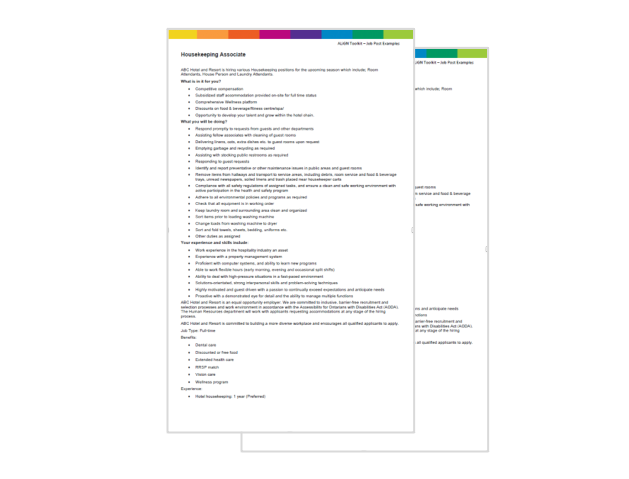
Job Ad Activity Examples

ALiGN Toolkit

Example 1: Food and Beverages 

Example 2: Housekeeping


Help job seekers identify key words from the Spark Portrait in job description to determine if they are a good fit.

Picture
Audience: Job Seeker
Format:  Word/PDF
Program: ALiGN Toolkit
Course: Presentation 2 of 2

Picture
  • ALiGN and your Job Search

Picture
  • ALiGN Toolkit Presentation 1 of 2
  • ALiGN Toolkit Presentation 2 of 2
  • Lumina Splash App PowerPoint
  • ALiGN Toolkit Facilitator Guide

Picture
  • Review the ALiGN and Your Job Search lesson in the ALiGN Toolkit Facilitator Guide and create notes on the presentation note page in
    section 2.
  • Ensure job seekers have completed their assessments.

Picture
  • Facilitate a training session, in a one-on-one, classroom or virtual classroom setting, in which you complete just the ALiGN and Your Job Search lesson as laid out in the ALiGN Toolkit Facilitator Guide to accompany other lessons you have planned.
  • Facilitate the whole Presentation as outlined in the ALiGN Toolkit Facilitator Guide in a classroom or virtual setting.
  • Have job seekers review the PowerPoint presentation as an independent study.

Picture
  • Continue with lessons and activities provided in the Lumina Splash App PowerPoint of the ALiGN Toolkit program, if desired.
← Job Fit Guide
Career Workbook →
Picture
Picture
Picture

Copyright © 2024 OTEC
  • Home
  • Table of Contents
  • Career Counsellor
    • The Spark Portrait
    • The Splash App
    • Presentation (1 of 2)
    • Presentation (2 of 2)
    • Lumina Splash App
    • Facilitator Guide
    • Job Seeker Dashboard
    • Job Aid for Employers
  • Job Seekers
    • Spark Portrait - Video
    • Spark Portrait - Workbook
    • Notes for Career Counsellors
    • Strategies for Working Together
    • Job Seeker Questionnaire
    • Completing the Assessment
    • My Personal ALiGN Guide
    • Job Fit Guide
    • Job Ad Activity - Examples
    • ALiGN Career Workbook
    • Lumina Splash App Instructions